What We Build How Proof Recruiting See the live demo Book a Call
College Recruiting

Thousands of emails into
organized prospect profiles.

Every recruiting email is read, the details lifted out of the prose and filed to the right player. You just open the board.

No signup — password demo1234

Ask it in plain English Portal transfers flagged Setup done for you
Your inbox
Dana Novak · parentRE: 2027 uncommitted SS — my daughter Mia
Coach Ruiz · club coachWeekend showcase roster — Minnesota Renegades
Amelia Nakamura · recruitUncommitted 2B — can I visit campus this fall?
Amelia Dawson · recruitReclassed for 2027 — following up on my last email
Marc Osborne · parentHarper's transcript + test scores
Harper Osborne · recruitCamp question + my showcase numbers
One board

Recruiting Board

Every prospect on your radar, in one place.

53 players match
Mia Novak B/TL/R
Class2027
High Visit scheduled
Marietta, GA·Minnesota Renegades
SS C
mia.novak5@icloud.com (500) 555-0116
Bio Leadoff bat, plus speed, strong arm from the middle infield.
7 emails Last Yesterday
Amelia Nakamura B/TR/R
Class2027
Medium Camp invite sent
Broomfield, CO·Colorado Stars
2B
amelia.nakamura6@outlook.com (897) 555-0167
Bio Uncommitted — would love to visit campus this fall.
3 emails Last 2d
Amelia Dawson B/TR/R
Class2027 Transfer
High Visit requested
Loveland, CO·Georgia Impact
P
amelia.dawson9@outlook.com (670) 555-0150
Bio Reclassed for 2027; looking at MAC and Horizon programs.
5 emails Last 4d
Harper Osborne B/TR/R
Class2026
Watch Camp registered
Powell, OH·SoCal Athletics
P OF
harper.osborne6@gmail.com (629) 555-0179
Bio Coming off a strong showcase; academic-first family.
9 emails Last 1w

sample data the real one is your inbox

4,000
recruiting emails read and sorted
1,500
tracked prospects on one board
1
full recruiting cycle, start to finish
A Division I softball program Measured on its live board — not a projection.
The problem

Every recruit arrives as an email. None of them arrive the same way.

A recruiting inbox is not a pipeline. It is a pile — and the only thing standing between a prospect and being forgotten is whether somebody had time to type her into a spreadsheet.

Three senders, one player

The player writes. Then her mom writes. Then her club coach sends a roster with her buried on line nine.

The details are in prose

Class year, position, hometown, travel team and a film link — scattered across a paragraph, never a field.

Untyped is unrecruited

Anything nobody hand-enters is gone by August. The spreadsheet is only ever as current as your last free hour.

How it works

Three steps, and the last one is yours.

01

Connect the address once

Point it at your recruiting inbox and leave it alone. No forwarding rule, no plugin, no change to how anybody emails you — and nothing for your staff to remember to do.

02

It reads the prose

Player or parent or club coach, it works out who the message is actually about and lifts the details out of the paragraph — class year, positions, hometown, travel team, GPA, contact, film links.

03

You make the calls

Tier her High, Medium, Low or No Chance. Mark a visit, a camp invite, or both. Leave a note. The board reorders around what you decided — that part was always going to be yours.

What you get

The board, and three ways to interrogate it.

Tier ▾ClassLast
M. Reinhart20271d
A. Nwosu20273d
P. Vaughn20263d

The board

Sort by tier, class or last contact. Filter to a position, a class, or just the portal.

2028 middle infielders, GPA above 3.5?
Ask

Four on your board. Two are already tiered High.

M. Reinhart2028 · SS

Ask

Plain-English questions, answered from your own board — with her card beside the answer.

Players by class
26272829TR

Analytics

How many you're tracking, how many are in the portal, and where the class and position gaps are.

High2027 · SSOpen
Med2028 · COpen
Low2026 · OFFilled

Class needs

The roster gaps you're actually recruiting to, by class and position, marked off as they fill.
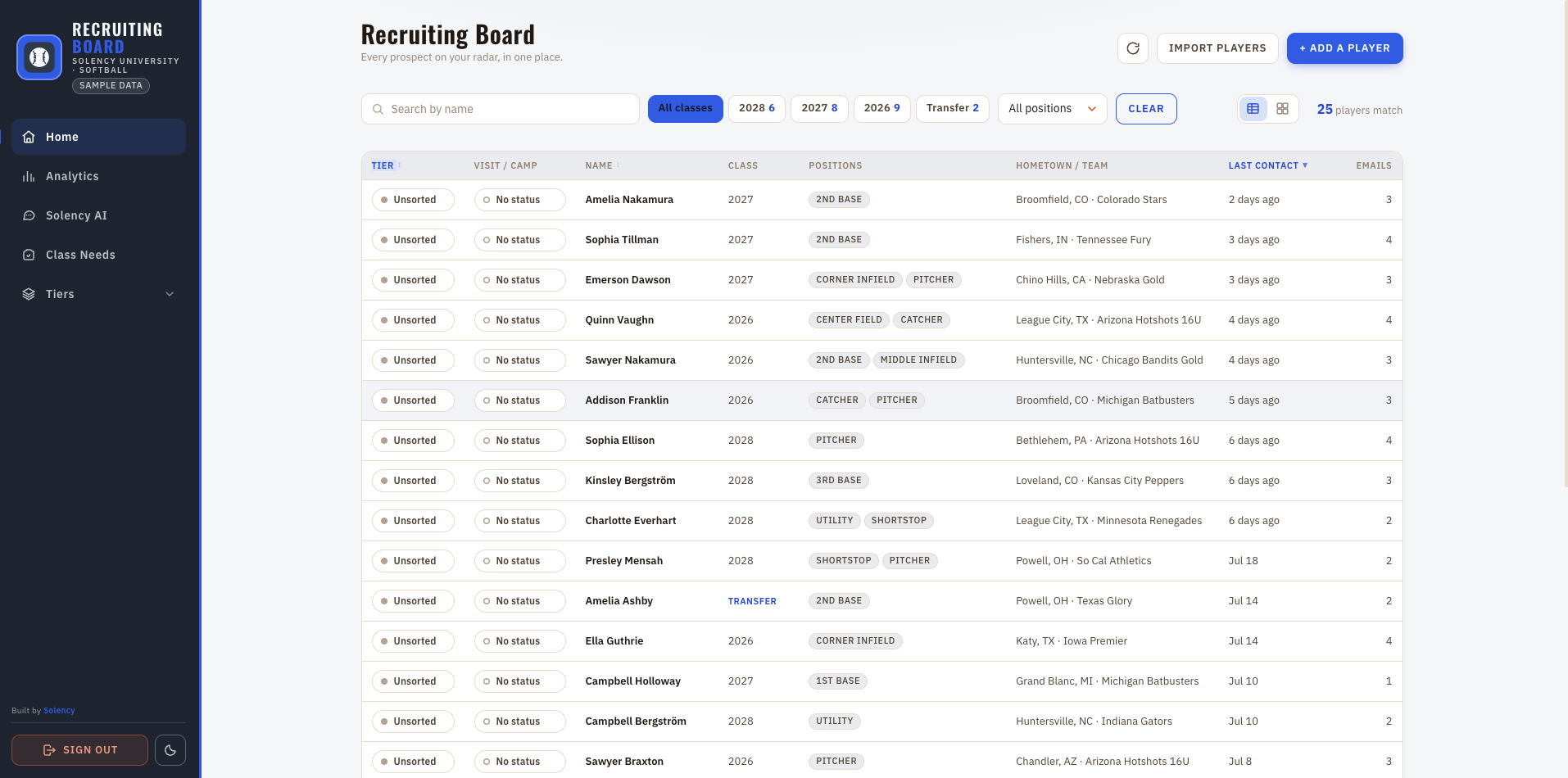
The recruiting board — every tracked prospect in one sortable list, annotated: sort by tier, filter to a position or class, portal transfers flagged, and last contact in plain language. (Sample data.)
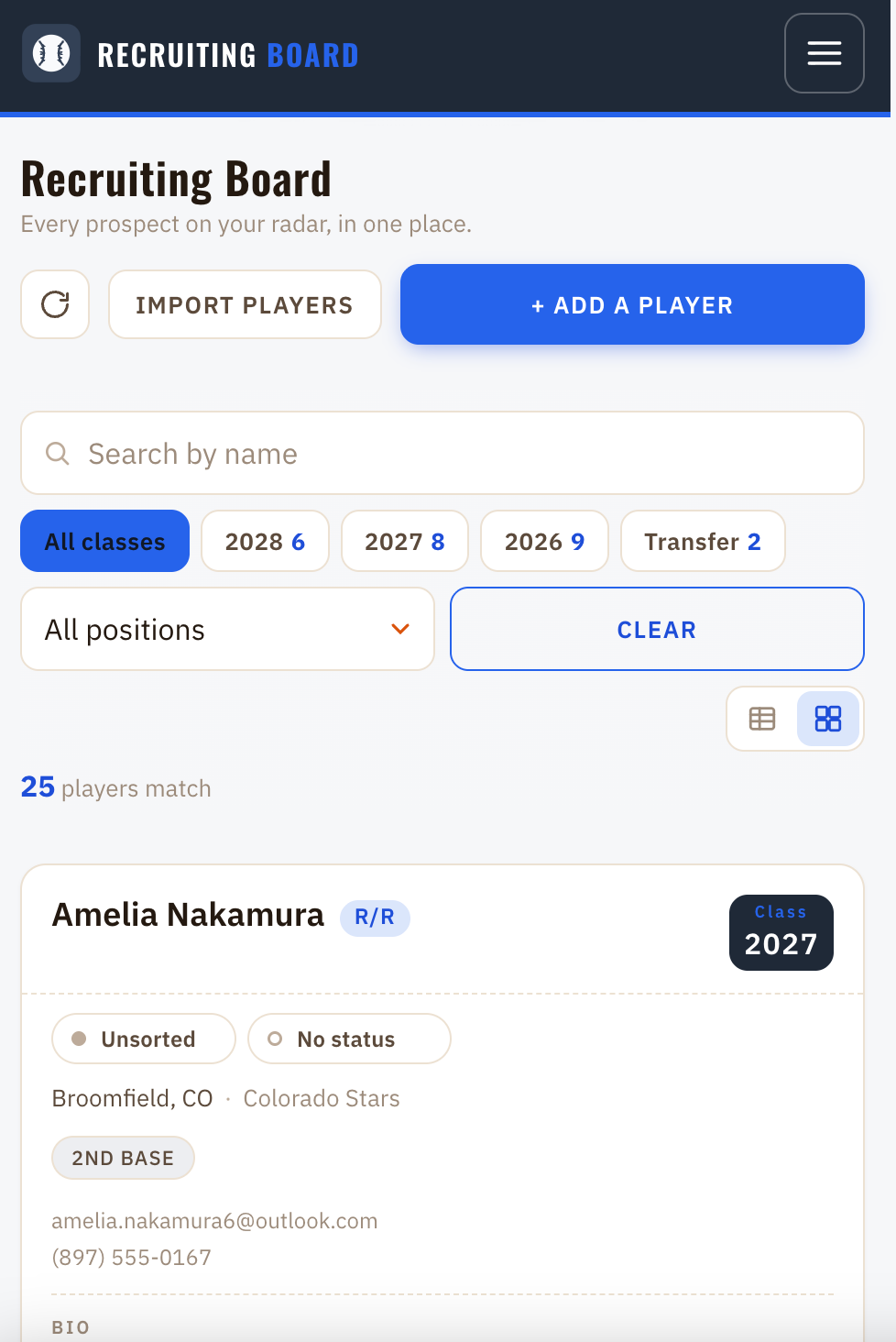
The same recruiting board on a phone — stacked filters, class chips, and prospects as full-width cards. (Sample data.)

And on a phone. Same board, installable, no app store.

  • Sort by tier
  • Filter to a position or class
  • Portal transfers flagged
  • Last contact, humanised

The board. Every prospect in one sorted list — tier, visit status, class, positions, hometown and team, last contact.
Maddie Reinhart B/TR/R
Class2027
High Visit
Dublin, OH·Ohio Elite 16U
SS 2B Slapper
maddie.reinhart27@example.com (614) 555-0148
Film / Links
Hitting — Jun 2026 ↗ Fielding reel ↗ Skills video ↗
7 emails Last Yesterday

The player. Everything she and her people have ever sent, on one card.

One card per player, built out of her emails.

Four emails from a player, her mother and her club coach become one prospect — not four rows. Contact details, class year, positions, hometown and travel team fill themselves in, and every film link she has ever sent stays attached to her, with the duplicates collapsed.

Her whole email history stays on the card, so you can read what she actually said before you call. Portal transfers get flagged as they arrive. Your notes sit alongside — and if you already keep a spreadsheet, it imports, so your existing list is on the board from day one.

And under it, every email she ever sent you.

Not a summary of them — the messages themselves, most recent first, with the original text kept word for word. The recruiting-service boilerplate and the tracking markup are stripped out; what's left is what she actually wrote.

It is the thing you want ninety seconds before you pick up the phone, and it is the reason nobody on your staff has to remember a conversation they had in March.
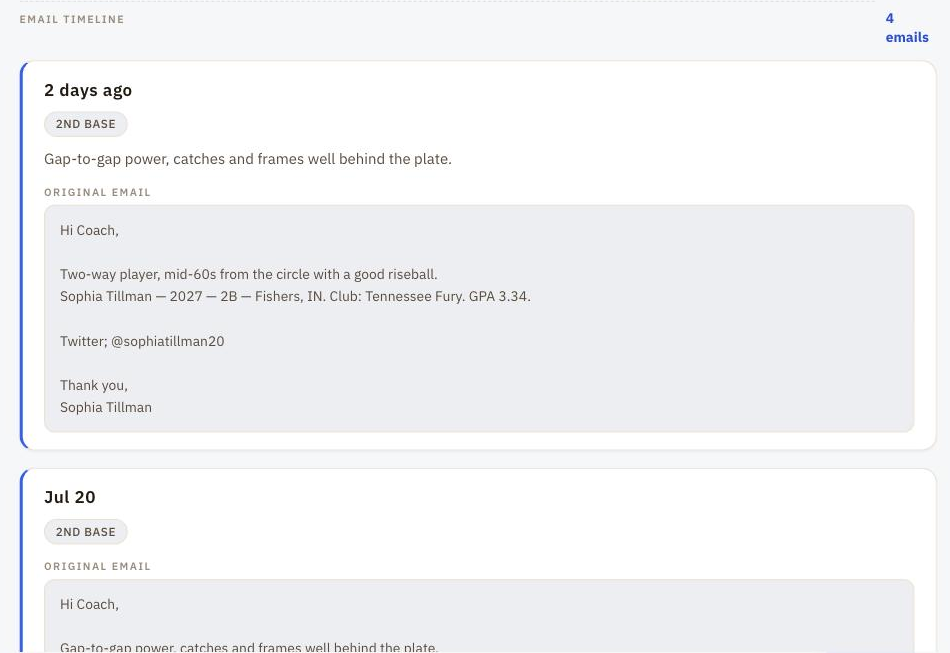
A prospect's email timeline — four messages listed newest first, each with its date, the positions read out of it, and the original email preserved in full. (Sample data.)
Ask

Ask your board a question. In English.

No query builder, no saved filters to maintain. Type the thing you were going to ask your assistant and get it back off your own data.
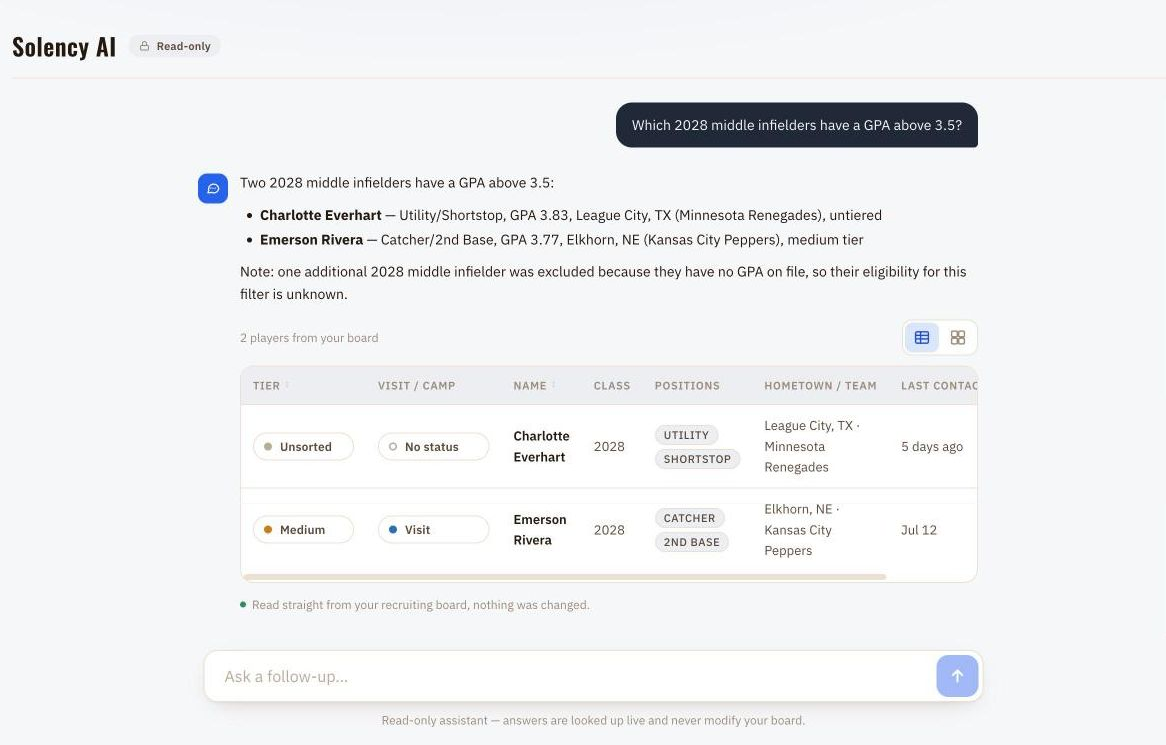
Asking the board "Which 2028 middle infielders have a GPA above 3.5?" — the answer names two players with their GPAs, notes that a third was excluded for having no GPA on file, and renders both players' rows from the board beneath it. (Sample data.)

It cannot invent a player. The players listed under an answer are rendered from the actual query result, not read out of the model's text — so a name on screen is a row on your board or it isn't there at all. And it only ever reads: nothing it does can change a tier, a note, or a prospect.

Run it, don't just keep it

What your board is, and what it still needs.

Analytics

How many you're tracking, how many are in the portal, how much mail actually came in, and where your classes and positions are thin. The shape of the recruiting year, without anybody building a pivot table.
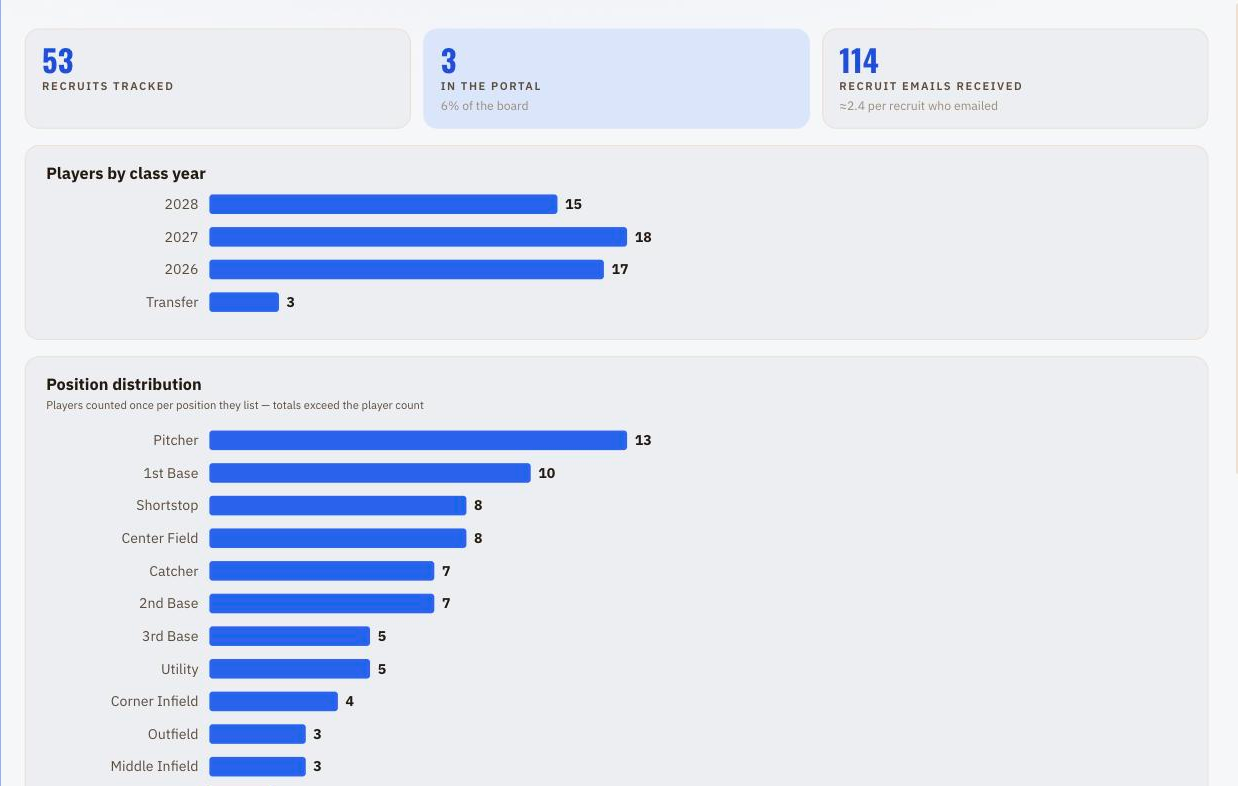
The analytics view — 53 recruits tracked, 3 in the portal, 114 recruit emails received, with bar charts breaking the board down by class year and by position. (Sample data.)

Class needs

Your own list of the gaps you're recruiting to — class, position, priority, a line of context — ticked off as they fill. You write it and you close it; it's a tracker sitting beside the board, not a matchmaker running against it.
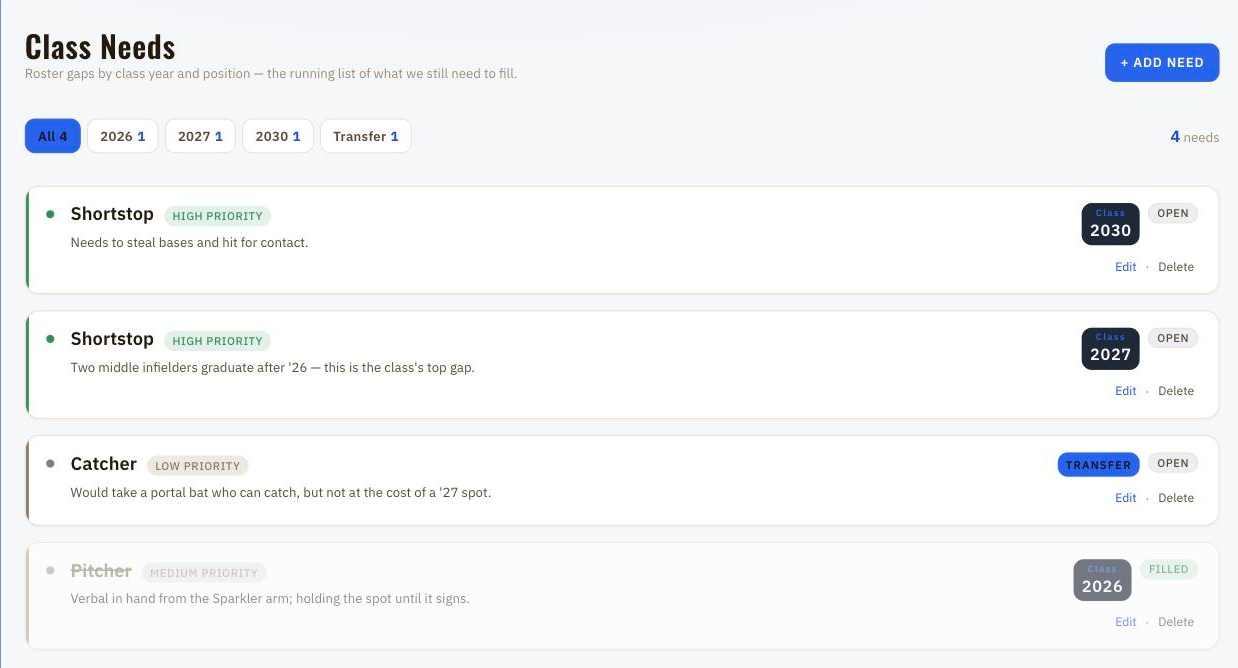
The class needs view — four roster gaps by class and position with priority and open or filled status, one of them struck through as filled. (Sample data.)
Everything else

The rest of what's already in there.

Tiers

Coach-assigned High / Medium / Low / No Chance, plus an Unsorted pile that's the default view.

Visit / camp

Visit · Visit + Camp · Camp Invite, editable inline beside tier.

Notes

Per-player notes log, kept beside her emails.

CSV import

Drag-and-drop bulk import with header synonyms, a preview before anything writes, and duplicate detection.

Transfer flag

Portal transfers detected at ingest, badged on the card, filterable on the board.

Search & filters

Search by name; filter by class, position, tier, slapper, portal.

Phone app

Installable to the home screen, portrait-locked, pull-to-refresh, branded offline page. Never caches recruit data.

Dark mode

Viewer-persisted light/dark across the whole dashboard.

Whole staff

One shared program password. No per-seat pricing.

Film de-dup

Links de-duplicated across tracking-token variants and click-tracker wrappers, then split into Social and Film / Links.

GPA & bats/throws

Each email is classified and mined for name, email, phone, class year, positions, hometown, travel team, GPA, bats/throws, tournament, bio and links.

Add manually

Add a player by hand with duplicate-name protection.

Who this is for

Built for programs that recruit by email.

You, if
  • recruits, parents and club coaches email your staff directly
  • your current system is a spreadsheet somebody maintains by hand
  • you're one program, not a whole athletic department
  • you want it running this month, not next season
Probably not you, if
  • you need NCAA compliance workflows and reporting
  • you need outbound campaign sending
  • your department already runs a suite and you can't add tools
Before you ask

Three answers, before the price.

It has already run a season

Built for — and running live at — a Division I softball program through a full recruiting cycle. On that board: 4,000 recruiting emails read and sorted into 1,500 tracked prospects. Measured, not projected.

It's locked down

Encrypted in transit and at rest, access-controlled, scoped so your program only ever sees your own data. Encrypted off-site backups with a restore process we rehearse against real backups — worst case you lose a day of notes, not your board.

Thirty days to change your mind

If it isn't earning its place on your staff's screens in the first month, email us and we refund it in full. No auto-renewal surprises either — we email you 30 days before the year is up.

Pricing

One plan. One price.

Founding price
$998/ year

One flat price for the whole staff — no per-seat, no per-prospect.

  • Unlimited prospects
  • Your whole staff
  • Board, Ask, analytics, needs
  • Your spreadsheet imported
  • Setup done for you
Book a 15-min demo Covered by the 30-day refund above.
Questions coaches ask

Straight answers.

What happens to our data if we leave?

You ask for it and we send it — the whole board and the raw record of the mail behind it. Straight about the shape of that: there is no export button in the app today. Getting your list in is self-serve; getting it back out is a request a human handles, and we handle it whether you're renewing or walking. It is never sold, and each program's data is scoped so only that program ever sees it.

Does it work with Gmail as well as Outlook?

Outlook today. That's what the live program runs on and it's the only mail provider we've had in production, so it's the only one we'll promise you. The provider connection is a single layer at the very front — nothing downstream of it knows or cares where a message came from — so Gmail is a connector swap rather than a rebuild. But we haven't put a Gmail program live yet, and we'd rather tell you that than sell you a maybe. If you're on Gmail, raise it on the call.

Do we have to change how recruits email us?

No, and neither do they. Recruits, parents and club coaches keep writing to the same address in the same way, and none of them can tell anything changed. There's no forwarding rule for your staff to remember, nothing to install in anyone's mail client, and no second address to hand out. It reads the inbox you already have and leaves it exactly as it found it.

What if it reads an email wrong?

Two things stand between that and a bad decision. The original email stays on her card, word for word — so anything the extraction misread, you can see the truth of without leaving the page. And your judgment is stored separately from anything it reads: tiers, visit and camp status, and your notes are yours, and nothing arriving in the inbox overwrites them. What you can't do yet is hand-edit an extracted field on a player the inbox created — tell us and we correct it at the source. Players you add by hand you can edit and delete freely.

How long is setup?

One short call on your end. We connect the inbox and do the rest, and new mail starts getting filed as soon as it's live. Then we work backwards through the history already sitting in that inbox, which is the part that turns years of mail into a populated board rather than an empty one — it runs in the background while you're already using it. If you keep a spreadsheet, that imports too.

Does it work for sports other than softball?

It was built for softball and softball is the only sport it has run for — worth saying plainly. But the sport-specific parts are small and nameable: the position vocabulary, bats/throws, and a slap-hitter flag. The machinery underneath is not softball at all — one prospect assembled out of mail from four different people, class year, club team, portal inquiries, film links, last contact. Another sport means tuning that vocabulary, not rebuilding the product. You'd be the first, and we'd scope it honestly as that.

Stop retyping your inbox.

Book a 15-min demo